Why Choose an IT Vending Machine for Your Business?
Why Choose an IT Vending Machine for Your Business?
Businesses are under pressure to deliver laptops, keyboards, chargers, and other devices without slowing employees down. An it vending machine offers a controlled, self-service option for urgent equipment needs. An employee can scan an ID card, choose an approved item, and collect it within minutes. No crowded storeroom. Less waiting.
IT asset-management consultant Daniel Harper explains, “The value is not the machine itself; it is the traceable access around it.” This principle matters. Each transaction can record the user, device, time, and location. That information supports inventory accuracy and clearer accountability. It also helps support teams identify repeated equipment requests.
A well-designed it vending machine can combine barcode scanning, secure compartments, remote monitoring, and inventory software. Imagine a technician collecting a replacement mouse at 7:30 a.m. before a client call. The system can send a notification immediately. Managers may also set approval rules for expensive laptops or specialized tools.
The benefits are practical, but they are not automatic. Poor replenishment can leave empty compartments. Weak integration can create duplicate records. Employees may also resist the process if the interface feels confusing. That is worth admitting.
The strongest results come from a pilot program, clear ownership, and regular usage reviews. Businesses should measure response time, stock accuracy, unauthorized withdrawals, and employee satisfaction. An it vending machine is not a complete IT strategy. It is a focused operational tool that can make equipment access faster, safer, and easier to audit.
What Is an IT Vending Machine and How Does It Work?
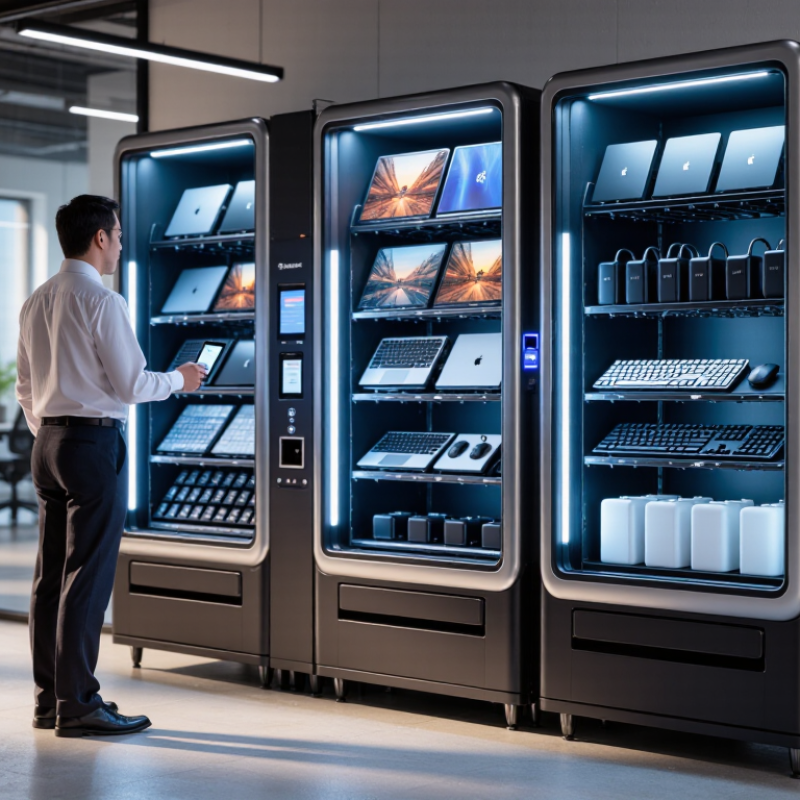
An IT vending machine is a secure, self-service cabinet for distributing approved technology supplies. It can hold keyboards, chargers, headsets, cables, and replacement laptops. Employees authenticate with an ID card, mobile code, or company credentials. The door unlocks, the item is scanned, and the transaction enters an asset-management system.
Sensors monitor stock levels, temperature, and unusual access. When supplies run low, the system can notify an IT team or trigger replenishment. This reduces desk-side requests and gives technicians a clearer record of who collected each item. The 2024 Data Breach Investigations Report found that human involvement appeared in 68% of breaches. Controlled access cannot solve every risk, but it limits casual handling of sensitive equipment.
The business value is practical. An employee may need a mouse at 7:30 a.m., not after a support queue opens. A vending machine keeps common items available around the clock. It also creates useful usage data, such as repeated charger failures or seasonal demand. A 2024 global IT asset-management survey reported that organizations continue to struggle with incomplete inventory records. Automation helps, but it is not perfect. Poor labeling, weak authentication, or empty compartments can quickly damage trust. Human review still matters.
Which Business Problems Can an IT Vending Machine Solve?
Why Choose an IT Vending Machine for Your Business?
Which Business Problems Can an IT Vending Machine Solve?
An IT vending machine can solve everyday equipment problems that slow employees down.
A worker may need a keyboard, headset, charger, or security token during a busy shift. Walking to a central storeroom wastes time. Waiting for an administrator creates even more delay.
Controlled self-service makes supplies available near the point of work. Employees can use approved access methods to collect assigned equipment. Each transaction records the user, item, and time. This creates a clearer audit trail than informal desk-side handouts. Stock levels can also trigger replenishment before critical items disappear.
Remote offices benefit greatly.
A small site may not have a full-time IT technician or storage room. The machine can hold common replacement items and reduce unnecessary travel. It can support onboarding, too. New employees may collect prepared equipment on their first day, even outside normal office hours.
It is not magic.
Poor item selection can create expensive dead stock. I have seen teams overfill machines with rarely used accessories. Usage reports should guide adjustments every month. Security controls also need review, especially when devices contain company data. A vending machine improves access, but it does not replace asset management, employee training, or careful procurement.
How Does It Improve Equipment Access and Employee Productivity?
Why Choose an IT Vending Machine for Your Business?
How Does It Improve Equipment Access and Employee Productivity?
An IT vending machine gives employees quick access to approved workplace equipment. They can collect a mouse, keyboard, headset, charger, or adapter without waiting for a support appointment. This matters when a damaged cable stops work at 9:10 a.m. The employee scans an ID card, selects the item, and returns to the task. Small delays often become expensive interruptions.
For IT teams, the machine creates a clearer equipment trail. Access records can show who collected an item and when it was issued. Inventory alerts can support timely restocking. Managers can also review usage patterns before changing purchasing plans. In practice, this reduces repeated requests and helps support staff focus on complex problems. It also supports consistent equipment standards across offices and shifts.
It is not a magic fix. A poorly stocked machine creates frustration. Employees may also choose the wrong accessory without clear labels. A short pilot can reveal these weaknesses. Track collection times, stockouts, return rates, and employee feedback. Keep instructions simple and protect access data. The strongest results come from regular reviews, practical item choices, and human support when the machine cannot solve the problem.
Why Choose an IT Vending Machine for Your Business?
An IT vending machine gives employees immediate access to approved peripherals and replacement equipment, reducing the time spent waiting for routine IT support.
Planning benchmark: estimated minutes per standard equipment request. A self-service model can reduce access time from approximately 30 minutes to 5 minutes, saving about 25 minutes per request and helping employees return to productive work faster.
What Costs and Security Factors Should Businesses Consider?
Why Choose an IT Vending Machine for Your Business?
An IT vending machine can shorten replacement time when employees need keyboards, chargers, or headsets. Yet the machine is not automatically cheaper. Businesses should price the hardware, installation, inventory, software licenses, replenishment, repairs, and electricity. They should also measure unused stock. A locked cabinet filled with outdated adapters becomes an expensive storage problem. In practical deployments, item demand often changes by department and season. A small pilot can reveal these patterns before wider investment.
Security costs deserve equal attention. The 2024 Verizon Data Breach Investigations Report found that the human element appeared in 68% of breaches. Access controls therefore matter, even for simple equipment. Use employee authentication, role-based limits, transaction logs, and automatic alerts for unusual withdrawals. The machine should support encrypted communications and regular firmware updates. It also needs physical protection, camera coverage, and a clear process for lost credentials. Convenience must not create an unmonitored supply door.
The financial risk can be substantial. The 2024 Cost of a Data Breach Report placed the global average breach cost at 4.88 million dollars. That figure does not mean every vending deployment creates similar exposure. It does show why connected devices need careful governance. IT teams should review network segmentation, vendor access, retention periods, and incident response plans. A weakness remains. Many companies calculate purchase price but overlook replenishment errors and access reviews. That gap deserves honest attention.
How Can a Business Plan and Implement an IT Vending Machine?
An IT vending machine works best when it solves a measured access problem. A business should review help-desk tickets, onboarding delays, and after-hours requests before buying equipment. Common items include keyboards, mice, cables, chargers, headsets, and approved adapters. Avoid stocking expensive devices without approval controls. That creates waste.
The 2024 State of IT report indicates that many organizations continue balancing tighter budgets with growing technology demands. This makes controlled, local distribution valuable. Start with a four-to-six-week pilot in one office or shift-based site. Record item demand, failed transactions, refill frequency, and average resolution time. Use employee authentication and connect each transaction to an asset record. The 2024 Data Breach Investigations Report found that human involvement appeared in 68% of breaches. Therefore, access logs and clear approval rules matter, even for low-cost equipment.
Set minimum and maximum stock levels from real usage, not guesses. Review them weekly during the pilot. A simple dashboard can show cost per issue, stockouts, repeat requests, and returned items. Include accessibility needs and provide a human support route. Automation is not always convenient. Some employees may struggle with unfamiliar screens, payment-style interfaces, or incorrect item descriptions. That weakness needs review. After the pilot, compare results with the original baseline, adjust the catalog, and expand only when service quality improves without creating unmanaged inventory.